
AI & Future
Meet Dunea Code: a team of coding agents on your own machine
A free desktop app for macOS, Windows and Linux that runs Claude Code and Codex side by side. Every agent gets its own git worktree, its own ports and its own running dev server.
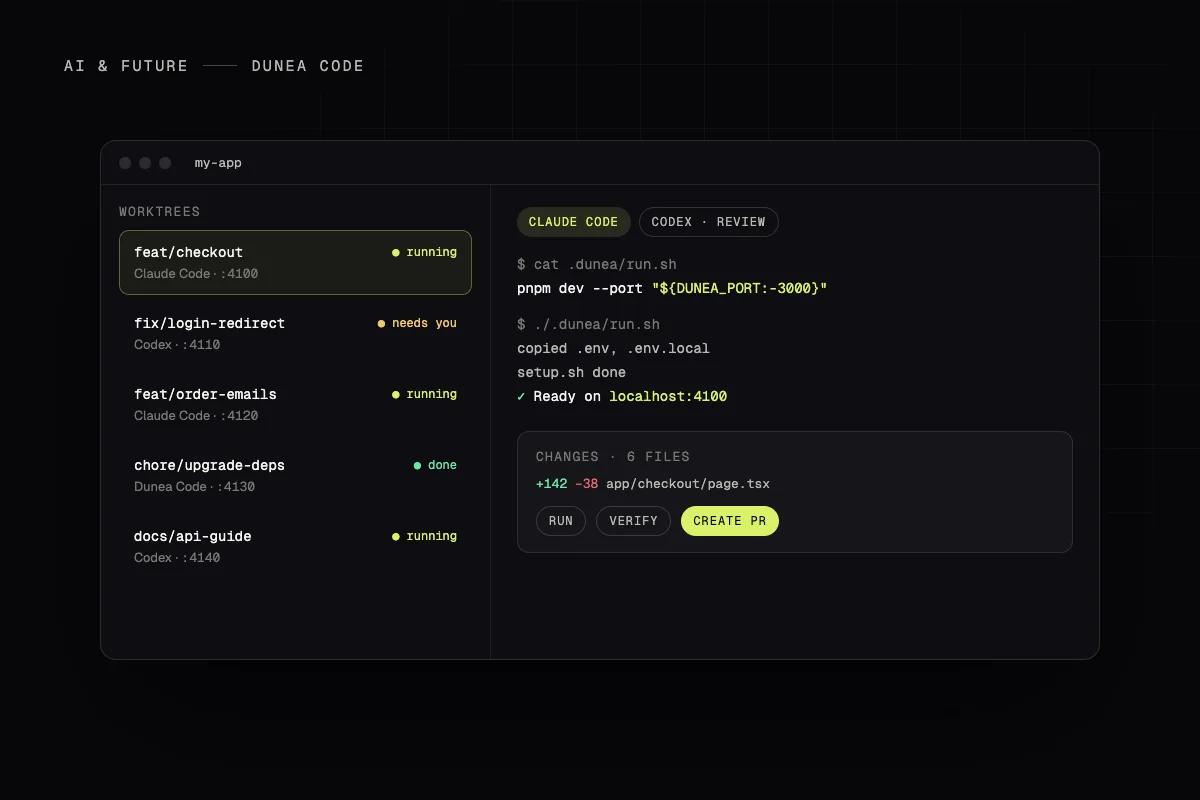
Coding agents got good enough that the bottleneck moved. Writing the code is no longer the slow part for many tasks. The slow part is everything around it: giving each agent a place to work, keeping them out of each other's way, and checking what each one did.
If you have tried running two Claude Code sessions in one repository, you know the problems. They edit the same files. You move one to a git worktree, and its dev server fails with address already in use because the other one has port 3000. The fresh worktree has none of your gitignored .env files, so the app doesn't start anyway.
Dunea Code is a free desktop app built around fixing exactly that. It runs Claude Code, Codex and Dunea's own coding agent side by side on your machine, and gives every task its own branch, its own ports and its own running copy of your app. It's available for macOS, Windows and Linux at code.dunea.ai.
One task, one worktree, one running app
When you start a task, Dunea creates a branch and a git worktree for it, next to your project. Worktrees share one .git history, so nothing is cloned again, and agents never touch each other's files.
Then it makes the branch actually run:
- Ports. Each worktree leases its own block of ports and gets them as
$DUNEA_PORTand$DUNEA_PORT_COUNT. Use the first for your dev server and count up for an API server, a worker or a debugger. - Your `.env` files. Dunea copies your gitignored
.envfiles into every new worktree before setup runs. - Setup and run scripts. Put
setup.sh,run.shandarchive.shin a.duneafolder. Setup runs once per worktree (install dependencies, run migrations), Run starts the dev server, and archive cleans up before a worktree is removed.
A minimal run.sh for a Next.js app is one line that matters: pnpm dev --port "${DUNEA_PORT:-3000}". The default keeps it working in your main checkout, which doesn't get DUNEA_PORT.
You don't have to write these yourself. Ask any agent in Dunea Code to "set up this repository for Dunea"; it reads the project and writes all three, including extra ports for every service.
The result is that five agents means five apps running at once, each on its own port, each one you can open in a browser while the agent is still working.
Claude Code and Codex, on your own accounts
You pick an agent per task, and you can open more chats on the same worktree with different agents.
- Claude Code runs on your Claude subscription or an Anthropic API key.
- Codex runs on your ChatGPT plan or an OpenAI API key.
- Dunea Code's own agent runs on Dunea credits, for starting without any other account.
A pattern that works well: Claude Code builds the feature, then a Codex chat on the same worktree reviews the branch and fixes what it finds.
The app itself is free. Claude Code and Codex never spend Dunea credits; credits are only used by the Dunea Code agent and the Suggest as you type feature. Every account starts with 10 free credits.
Decide how much each agent does alone
Each chat has a mode. Plan is read-only and proposes before it changes anything. Ask before edits and Accept edits keep you in the loop on files and commands. Auto, the default, lets routine actions through and still asks about risky ones. Bypass permissions never asks, and Dunea makes you confirm before you switch to it; it's for throwaway branches.
When an agent needs a decision, it lands in a queue. You can answer from the desktop, or from your iPhone with Dunea Remote, which pairs with the desktop app and is end-to-end encrypted.
Review like you'd review a colleague
When a task is done:
- Changes lists every file the agent touched, with split or unified diffs. Comment on a line to send it back to the agent.
- Run starts the branch's own app on its own port, so you can use the change rather than just read it.
- Verify hands the running app to a separate, read-only agent that exercises the change in a browser and records a video. Because it can't edit files, it can't change what it is testing.
- Create PR pushes the branch and opens a pull request on GitHub with a description written from the work. Merge is there once checks pass and the PR is approved.
When it's merged, Archive removes the worktree folder. The branch, its commits and its chats are kept, and you can restore it later.
For work bigger than one task
Overclock is for requests like "add accounts, billing and team workspaces". You describe it once. A planner splits it into features and tasks in dependency order, asks you about anything unclear, and runs the tasks across agents in their own worktrees, several at a time. A checker verifies each task before it counts as done, and the run ends in one pull request.
It remembers how you work
Agents save what they learn: your preferences, your corrections, and how each project is laid out. Memory about you is shared across projects; memory about a codebase stays with that project's worktrees. When an agent saves something, the chat says so, with a Forget button next to it. You can search, edit or turn memory off in Settings.
Your code stays on your machine
Your repository, worktrees and dev servers stay on your computer, and Dunea doesn't host your code. Claude Code and Codex talk to Anthropic and OpenAI the same way their command-line tools do.
Getting started
- Download Dunea Code for macOS 11 or later (Apple Silicon or Intel), Windows 10 or 11, or Linux (x64 AppImage). On Windows it needs Git for Windows, which also provides the shell agents run in.
- Sign in with your Dunea account, the same one you use for the website builder.
- Connect Claude or ChatGPT in Settings → Connections, or paste an API key.
- Open a project folder. A git repository gets worktrees and pull requests; a plain folder works too.
- Start a task in one sentence, and press Run when it's ready.
Next step
Download it from code.dunea.ai, open the repository you're working in today, and start two tasks at once. The guides for each part are in the Dunea Code docs.