
Tutorials
Open an online store in an afternoon
Products with sizes and colours, stock, discount codes, shipping, tax and order emails are already built into Dunea. A step-by-step guide from one paragraph to a live shop taking real orders.
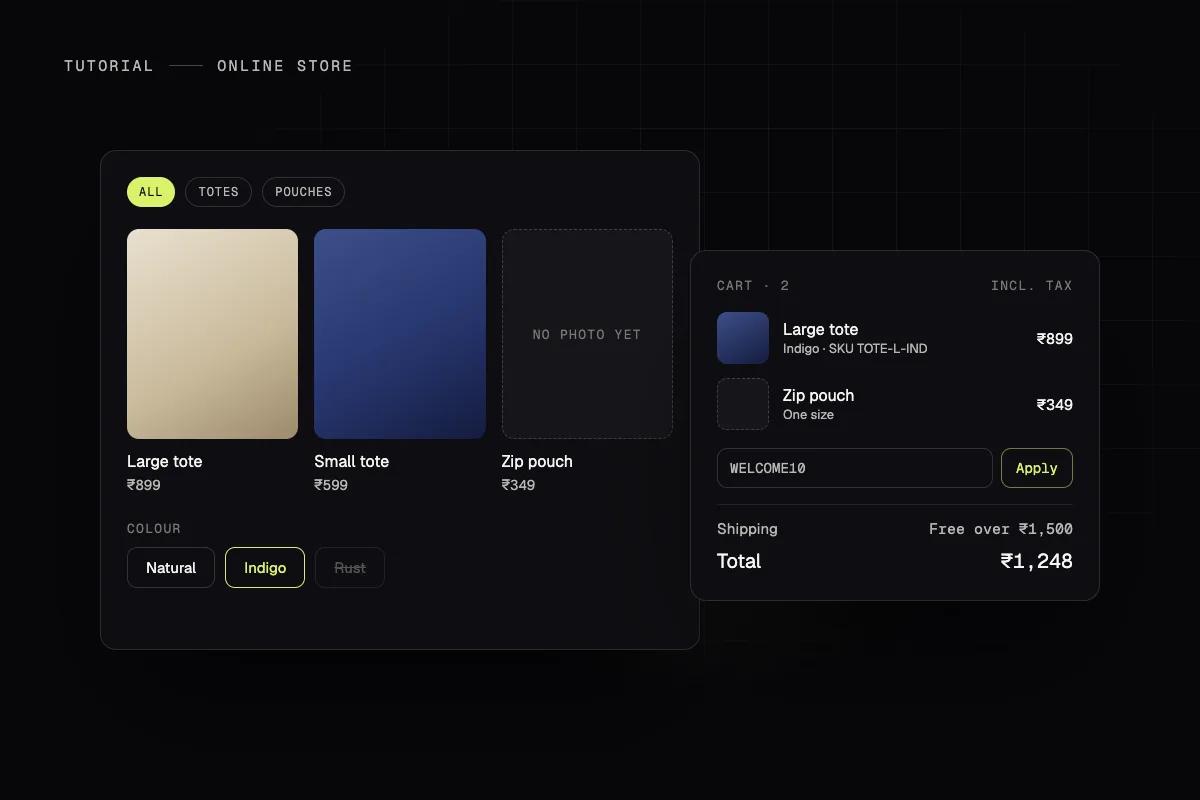
An online store has more moving parts than people expect. Products come in sizes and colours. Stock runs out. Someone has to email the buyer, work out shipping and show tax correctly. None of it is hard on its own, but together it is why a simple shop often takes weeks.
In Dunea, the store's machinery is already there. Products, variants, stock, orders, shipping, tax and order emails are managed in Dunea's Shop panel, and the AI builds the storefront around them. Here is how to go from nothing to a working store in an afternoon.
Before you start
Have three things ready:
- Your store name and the currency you sell in. New shops start in US dollars, so tell Dunea if you sell in rupees, pounds or anything else.
- How customers will pay. Cards through Stripe, Razorpay for India, direct UPI into your own UPI ID, cash on delivery, or a mix. (Our post on payments covers each one.) If you want direct UPI, have your UPI ID to hand.
- A first handful of products. Name, price, and options such as Size or Colour. Photos help, but you can add them later.
Step 1: Describe the store
Start a new project at app.dunea.ai and describe the business, not the website. For example:
"An online store for Kora, a small brand selling handmade cotton tote bags and pouches in Jaipur. Prices in rupees. Customers pay by UPI or cash on delivery. Start with three products: a large tote at ₹899 in Natural and Indigo, a small tote at ₹599, and a zip pouch at ₹349."
Dunea sets the shop up first: the store name, the currency and the payment methods you named. Then it creates the products, and then it builds the pages: a product grid with collection tabs, a product page with a picker for each option, a cart, a checkout form and an order status page.
If anything could not be set up, such as a payment method that needs your account details, Dunea says so in its final message rather than leaving you to find out at checkout.
Step 2: Check your products in the Shop panel
Open the Shop panel. Each product is there with its variants. When a product has options like Size and Colour, Dunea creates every combination as its own variant with its own SKU, so Large / Indigo can have its own price and stock.
From here you can:
- Edit names, prices and descriptions, and add images.
- Group products into collections, which become filter tabs on your shop page.
- Turn on inventory to count stock. When a variant sells out, its option is shown as sold out on the product page, and you get a low stock view of anything running short.
- Create discount codes. The cart always has a code box, and the discount shows as its own line in the totals.
Products and prices live in Dunea, not in the website's code. That means you can change a price without asking the AI to rebuild anything; the site picks it up on its own, usually within about 30 seconds.
Step 3: Shipping and tax
Two simple options cover most small shops:
- Flat-rate shipping: one shipping price, optionally free over an order amount. "Shipping is ₹80, free over ₹1,500" is all you need to tell Dunea.
- Tax-inclusive pricing: your prices already include tax, which is common for GST and VAT. The cart shows incl. tax instead of adding a tax line, and invoices show the tax portion.
Step 4: Order emails
Turn on Order emails and Dunea emails the buyer an order confirmation, a shipping update and a refund notice when those happen. It also emails you about every new order, so you don't have to keep the dashboard open.
When you ship an order, mark it fulfilled in the Orders list. That is what triggers the shipping email.
Step 5: Place a test order
Your shop is in test mode until you go live, and a banner on the site says Test mode — no real payments. Use it. Open the preview on your phone, add something to the cart, apply a discount code, and check out with each payment method you offer.
Things worth checking on the way:
- Does the product page show the right price when you change the size or colour?
- Is the cash on delivery confirmation clear that the order is not yet paid?
- For UPI, does the payment screen show your name and the right amount?
- Does a product without a photo still look intentional? Dunea uses a designed placeholder rather than a broken image, but your real photos will look better.
Test orders are labelled as test orders, so they won't be confused with real ones.
Step 6: Publish and go live
Publish the site from the Publish button. Publishing is part of Dunea's paid plans; see pricing. Then open the Payments panel's Go live section, finish the steps it lists, and switch to live. The test banner disappears and the shop takes real orders.
Optional: reviews
Once real orders arrive, the Reviews plugin adds star ratings and reviews to product pages. A week after an order ships, Dunea emails the buyer a link to review what they bought, and those reviews carry a verified buyer badge. Every review waits for your approval before it appears.
Dunea will not invent reviews or ratings to fill the page. Until real ones arrive, the product page shows an honest No reviews yet state.
What you'll have at the end of the afternoon
- A shop with products, variants and stock, managed in one panel.
- A cart with discount codes, shipping and tax worked out on the server.
- The payment methods your customers actually use.
- Emails that go out on their own when an order is placed, shipped or refunded.
Next step
Write the one paragraph that describes your store, with your currency, your payment methods and three products, and send it to Dunea at app.dunea.ai. Add the rest of your catalogue in the Shop panel once the first order goes through.