
Product Updates
Order bumps, upsells and one-time offers: sales funnels in Dunea
A funnel shows one offer at a time and counts how many people move on at every step. How opt-ins, order bumps, upsells and downsells work in Dunea, and how to describe your first funnel.
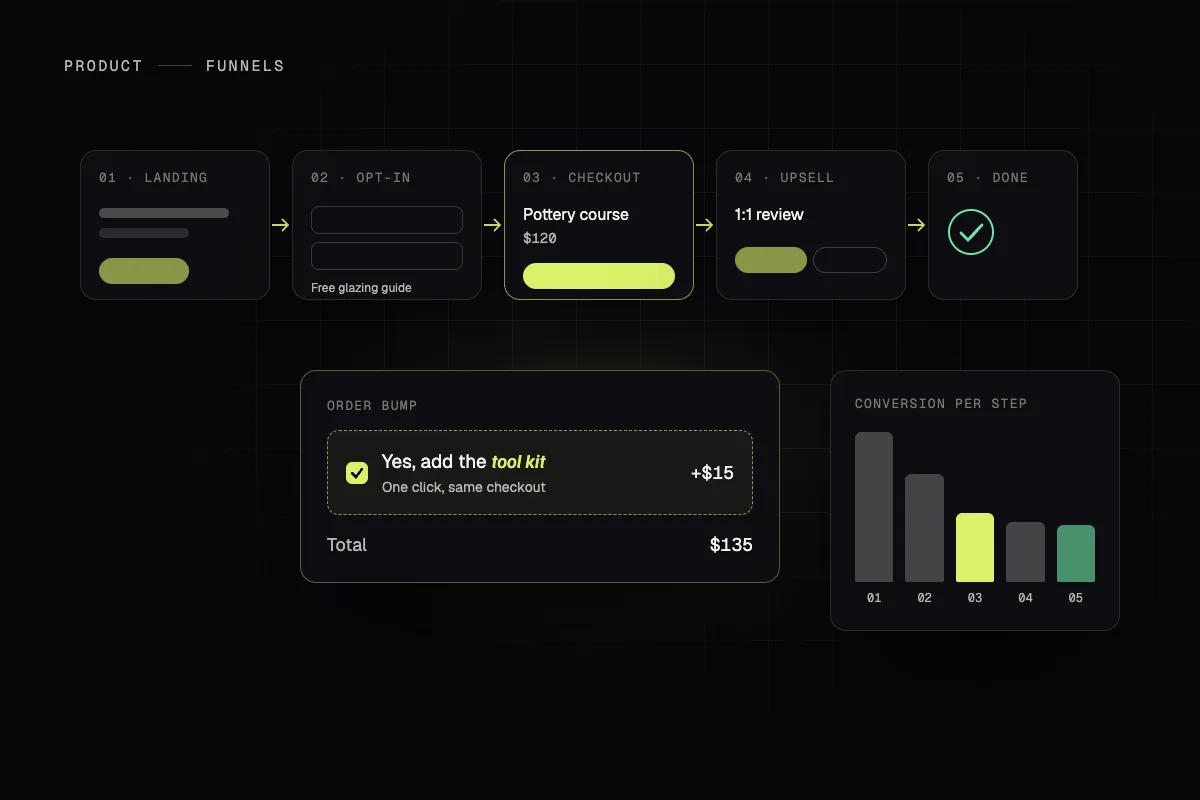
A shop shows everything at once and lets people browse. A sales funnel does the opposite: it shows one thing at a time, in a set order, and asks for one decision on each page. It suits a single main offer, such as a course, a workshop, a coaching package or a product launch, where you know what a buyer usually wants next.
Dunea's Funnels plugin builds that flow for you: opt-ins, checkout, order bumps, upsells and downsells, with conversion counted at every step. This post explains the parts and how to set one up.
The parts of a funnel
A typical funnel in Dunea runs like this:
- Landing page. The headline, the proof and one button.
- Opt-in. A short form for an email and a name, often in exchange for something free, such as a guide or a recorded workshop.
- Checkout. The main offer and its price, with one or more order bumps shown as checkboxes underneath.
- Upsell. After paying, one extra offer on its own page, with two answers: Yes, add it or No thanks.
- Downsell. If they said no, a smaller or cheaper alternative.
- Thank-you page. Confirmation and what happens next.
You don't need every step. A funnel can be just a checkout with a bump and a thank-you page.
Order bumps
An order bump is a small, related extra offered on the checkout page itself, before the buyer pays: the workbook for the course, the recording of the live session, a second pouch with the bag. It is a checkbox, so it costs the buyer one click to add and nothing to ignore.
The bump is paid in the same checkout as the main offer. Its price comes from Dunea, like every other price, so what the page shows is what the buyer pays.
Upsells and downsells (one-time offers)
An upsell is a bigger offer shown right after the purchase, when the buyer has just decided to trust you. People often call these one-time offers because they appear once, at that moment, rather than on your main site.
How the Yes works depends on the payment method:
- When the buyer paid with a saved payment method that can be charged again, accepting the upsell charges it instantly. No second form.
- When the method can't be charged again, as with Razorpay or UPI in India, accepting opens a second checkout, already filled in.
Dunea writes the button copy so it is true in both cases: Add to my order, rather than Charge my card now.
A No thanks takes the buyer to the downsell if you set one up, or straight to the next step if you didn't. That branching is part of the funnel's configuration, so the pages always follow the path you chose.
Setting one up
Start with the offer, not the pages. Have these ready:
- The main offer, its price, and what the buyer gets.
- One or two order bumps that genuinely belong with it.
- The upsell, and whether you want a downsell if they decline.
- The free thing for the opt-in, if you want to collect leads first.
Then tell Dunea, in your project at app.dunea.ai:
"Build a sales funnel for my 4-week online pottery course at $120. Start with an opt-in page offering a free glazing guide. At checkout, offer a $15 tool kit as an order bump. After payment, offer a one-to-one review session for $60 as an upsell, and if they decline, a $25 recorded critique as a downsell. End on a thank-you page that explains how to join the first class."
Dunea creates the funnel in the Funnels panel, with its steps, their order and the offers, and builds one page for each step. You'll see the steps and offers in the panel, where you can change a price or reorder steps without rebuilding the pages.
Taking payment
Funnel offers are paid through Payments, so they work with whatever methods you have turned on: Stripe, Razorpay, direct UPI or cash on delivery. If you offer more than one, the checkout step shows a choice. When a buyer pays by direct UPI, the thank-you page shows the QR code and asks for the payment reference, and the order waits for you to confirm it.
Like the rest of your site, the funnel starts in test mode with a visible Test mode — no real payments banner. Walk through the whole funnel in preview, taking the bump, accepting the upsell, then again declining it, before you go live from the Payments panel.
Conversion per step
Every step records its views, and Dunea counts opt-ins and purchases as they happen. The Stats in the Funnels panel show how many people reached each step and how many moved on, so you can see exactly where people drop off.
That's the point of building it as a funnel rather than a long page. If 40 people reach checkout and few of them pay, the checkout is the page to work on. If most people decline the upsell, try a different offer there before you touch anything else.
Dunea records these views itself. You don't need to add analytics code for them.
Do something with the leads
People who opt in are leads, and most funnels are worth running for the leads alone. Two things help:
- Email marketing. The Email marketing plugin sends leads, funnel opt-ins and customers to Klaviyo, Mailchimp or Brevo automatically. It only subscribes people who ticked a box saying they want your emails, and that box is never ticked in advance.
- Ad conversions. If you run ads, opt-ins are reported as leads and purchases as purchases to the tags you set up in the Marketing panel, so your ad platform can see which campaigns produce buyers.
Keep it honest
Funnels work best when each offer is something the buyer would plausibly want next. A few guidelines:
- Make the bump small and obviously related.
- Show the upsell once. Don't stack three in a row.
- Make No thanks as easy to find as Yes.
- Say what happens after payment on the thank-you page, in plain words.
Next step
Write down your main offer, one bump and one upsell, with prices. Then describe the funnel to Dunea at app.dunea.ai and walk through it in test mode before you go live.