
Product Updates
Taking payments on your own site: Stripe, Razorpay, UPI and cash on delivery
Cards worldwide, UPI and netbanking in India, payments straight into your own UPI ID, or cash when the order arrives. How each payment method works in Dunea, what your buyer sees, and what to tell Dunea to set it up.
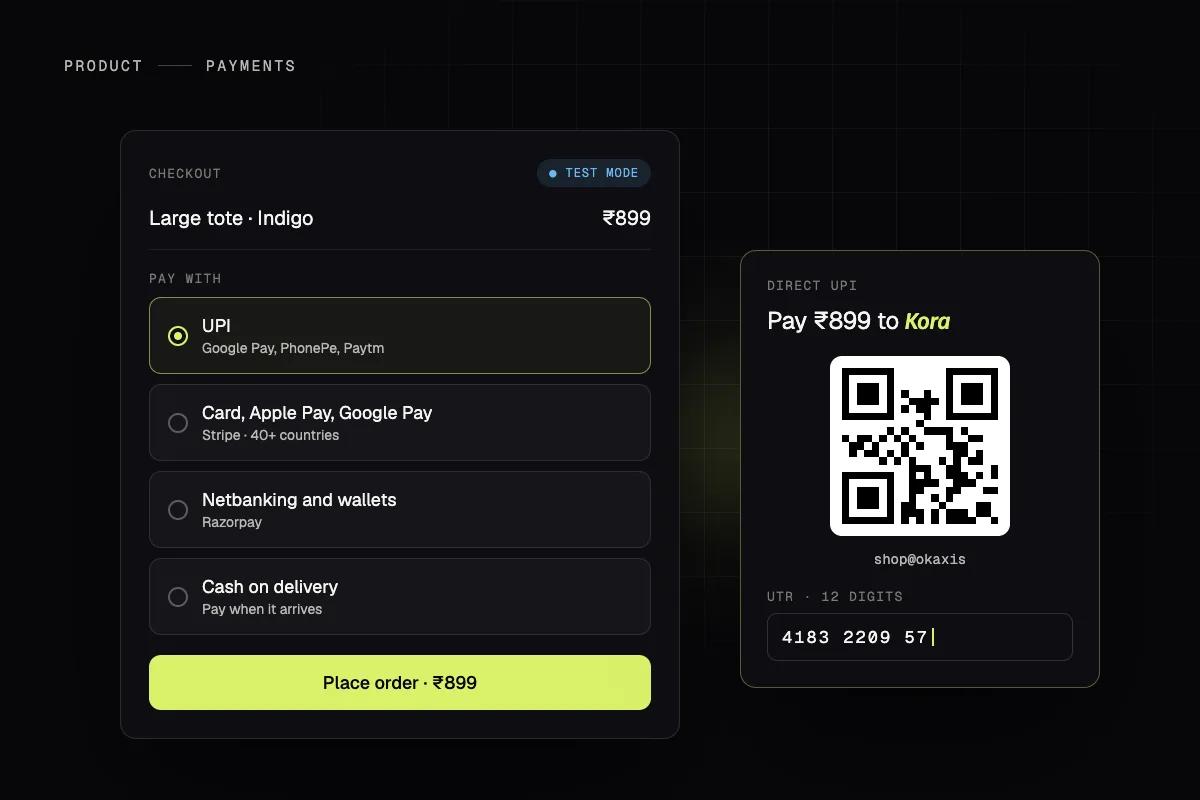
A design studio in London wants cards. A bakery in Pune wants UPI, and probably cash at the door as well. A coach selling a course wants Apple Pay to work on a phone without anyone typing a card number.
Dunea's Payments lets your site take money in all of those ways, and you choose which ones. This post covers the four methods, how each feels to your buyer, and what to say to Dunea to set them up.
One checkout for everything you sell
Payments is the part of Dunea that moves money. It works anywhere on your site: a shop, a sales funnel, a paid booking, a donation page or a single Buy button on a landing page. The shop and funnels both sell through it, so once you have set up payments, every other way of selling uses the same methods.
Two things are true whichever method you pick:
- Prices are set on the server. What you sell and for how much lives in Dunea, in the Payments panel. The page in the visitor's browser only says what is being bought; Dunea works out the price.
- Your site starts in test mode. While you are testing, a banner on the site says Test mode — no real payments, so a visitor who finds your site early knows no money moves. It stays until you go live.
Four ways to get paid
Stripe: cards, Apple Pay and Google Pay
Stripe takes cards, Apple Pay and Google Pay in more than 40 countries. You connect your Stripe account in one click from the Payments panel; there are no keys to copy.
At checkout, the buyer goes to Stripe's own payment page, pays, and comes back to a confirmation page on your site. That page waits a few seconds for Stripe to confirm the payment, then shows it as paid.
To test it before going live, pay with Stripe's test card, 4242 4242 4242 4242, any future expiry date and any CVC.
What to say to Dunea:
"Add a Buy button for my 90-minute strategy call, priced at $150, and a thank-you page that confirms the booking."
Razorpay: UPI, cards, netbanking and wallets for India
Razorpay is built for India: UPI, cards, netbanking and wallets in one checkout. Unlike Stripe, Razorpay's payment window opens on top of your page, so the buyer never leaves your site. If they close it, they stay where they were and nothing is charged.
To connect it, open your Razorpay Dashboard, go to Account & Settings → API Keys, and paste three things into the Payments panel: the key ID, the key secret and the webhook secret. Test keys start with rzp_test_ and live keys with rzp_live_, so you can set up both and switch when you are ready.
UPI (direct): straight into your own UPI ID
Many Indian sellers already take UPI by sharing a QR code on WhatsApp. Direct UPI does the same thing, properly, on your site, with no payment gateway and no gateway fees. The money goes straight to your own UPI ID.
Here is what the buyer sees:
- On a phone, a Pay with UPI app button opens Google Pay, PhonePe, Paytm or any UPI app with the amount already filled in. On a computer, they scan a QR code instead.
- After paying, they enter the UTR, the 12-digit UPI reference on their payment receipt, or upload a screenshot of the payment. Either is enough.
- Their order then waits for you. You check the UTR against your UPI app or bank statement and confirm it in Dunea. The buyer's page updates to paid on its own.
Nothing reports a UPI transfer back to Dunea automatically, which is why the buyer shares the reference and you confirm it. Unpaid UPI checkouts expire after 30 minutes, like any other checkout.
A tip from the setup screen: a business UPI ID (PhonePe Business, Paytm Business or Google Pay for Business) is free, and works more reliably with every UPI app than a personal one. Direct UPI is for payments in Indian rupees.
What to say to Dunea:
"I sell in rupees. Let customers pay by UPI to shop@okaxis, and show the UPI option first at checkout."
Use your real UPI ID. Dunea will not make one up; if you don't give it one, it will ask.
Cash on delivery
For physical goods, cash on delivery is often what customers trust most. The buyer places the order without paying, and you confirm the payment in Dunea when you collect it.
Cash on delivery is never chosen for the buyer. When your site offers more than one method, checkout shows a clear choice, such as UPI (Google Pay, PhonePe, Paytm), Pay online or Cash on delivery, and the confirmation page says plainly that the order is waiting for payment on delivery, not that it has been paid.
What to say to Dunea:
"Turn on cash on delivery for my shop, alongside UPI."
Going live
When you have tested a purchase end to end, open the Go live section of the Payments panel. It lists the steps that still need doing for the methods you have turned on. Once they are done, switch to live: the test banner disappears and your site takes real payments. You can pause live checkout from the same place if you need to, for example while you restock.
Your site has to be published for buyers to reach it. Publishing is part of Dunea's paid plans; see pricing.
After the sale
Every payment appears in the Payments panel with its status: pending, paid, failed, refunded, partly refunded or disputed. Refunds go through Payments too, so you don't need to log in to each provider to see what happened.
If you run ads, there is one more thing you get for free. Every checkout carries the visitor's campaign details, such as the UTM tags on the link they arrived from, so the Marketing panel can show you revenue per campaign. You don't add anything for this.
A sensible setup to start with
Start with one method, take a few real orders, and add the next when a customer asks for it.
- Selling worldwide: Stripe.
- Selling in India online: Razorpay, or direct UPI if you don't want a gateway yet.
- Selling physical goods in India: direct UPI and cash on delivery.
Next step
Open your project at app.dunea.ai and tell Dunea what you sell and how your customers like to pay. It will set up the checkout and the confirmation pages, and leave the test banner on until you go live. The full details are in the docs.